One More Lawn Custom Radio: Local Music and Streamer Rules
How One More Lawn's radio works: local tracks, Shared Music consent, Streamer Mode and the copyright line between built-in and player-loaded songs.
The radio is one of the best jokes in One More Lawn. It is also the feature most likely to get a streamer claimed. The game has built-in stations, an optional custom radio that can load local audio, and a Shared Music feature for co-op. The rules differ for each. This page explains what is confirmed, what is safe to stream and what to switch off before you go live.
The three audio layers
| Layer | What it is | Can you stream it? |
|---|---|---|
| Built-in radio | Superdou's in-game stations and joke songs | Yes, per the store's streaming guidance |
| Custom radio | Local audio files you load | Only if you own the rights |
| Shared Music | Host shares local audio with the lobby | Only with consent and rights |
The distinction matters. A stream that is fine with the built-in station can become a copyright problem the moment a player loads a commercial track.
Built-in radio: the safe layer
The built-in stations are part of the game. The store page says the in-game radio music can be used in streams and videos. That is a permission from the developer, not a guarantee against every platform's Content ID system, but it is the intended use.
The built-in songs include joke tracks. Some players have objected to the disclosure that parts of the radio are AI-generated. That is a taste and ethics debate, not a copyright one. If you are streaming, the developer's permission covers the built-in music.
If you want to avoid all user audio, enable Streamer Mode. It disables Shared Music, so a lobby guest cannot accidentally broadcast a track you do not have rights to.
Custom radio: local files only
The custom radio lets you load local audio. The exact folder and file format are not published, so do not follow a random path from a video. Use the in-game option if one is exposed, and check the game's own documentation or patch notes.
What is confirmed:
- The audio is local.
- It is not uploaded to a server by the custom radio feature.
- The developer's streaming permission does not extend to your files.
That last point is the one that matters. If you load a commercial album into the radio and stream it, you are responsible. The game is just playing a file.
Shared Music: consent is built in
Shared Music is a co-op feature. The host can share local audio with the lobby. It is off by default. Both the host and the listener have to agree, and the files are not uploaded.
The design is unusually careful for a comedy game. Use it the same way:
- Ask before you enable it.
- Confirm everyone is happy with the music.
- Do not share copyrighted material in a public lobby.
- Turn it off if anyone is streaming.
A listener who does not consent should not be forced to hear your playlist. The feature's default is the correct default.
Streaming: a simple decision tree
Are you using only the built-in radio? You are in the intended case. The developer permits it. Keep a note of the store page in case a platform asks.
Are you using custom radio with music you own? You are responsible. Make sure you have the rights, including for the platform you stream on.
Are you using Shared Music with guests? Turn on Streamer Mode or ask the lobby to disable it. A guest's track can trigger a claim even if you never chose it.
Are you making a video with the radio off? Then audio is not your problem. The mower and the grass sounds are part of the game.
The AI music question
The store page discloses that some radio content is AI-generated. Community reaction has been mixed. Some players refunded over it; others see it as optional joke songs in a small indie game.
For this guide, the practical points are:
- The disclosure exists.
- The AI tracks are part of the built-in radio, not the core simulation.
- The developer has not announced a toggle specifically for AI songs.
- If the topic matters to you, read the store disclosure before buying.
Do not expect a patch to remove the songs. Do not expect the game to hide them either. The radio is part of the tone.
Radio controls in the mower
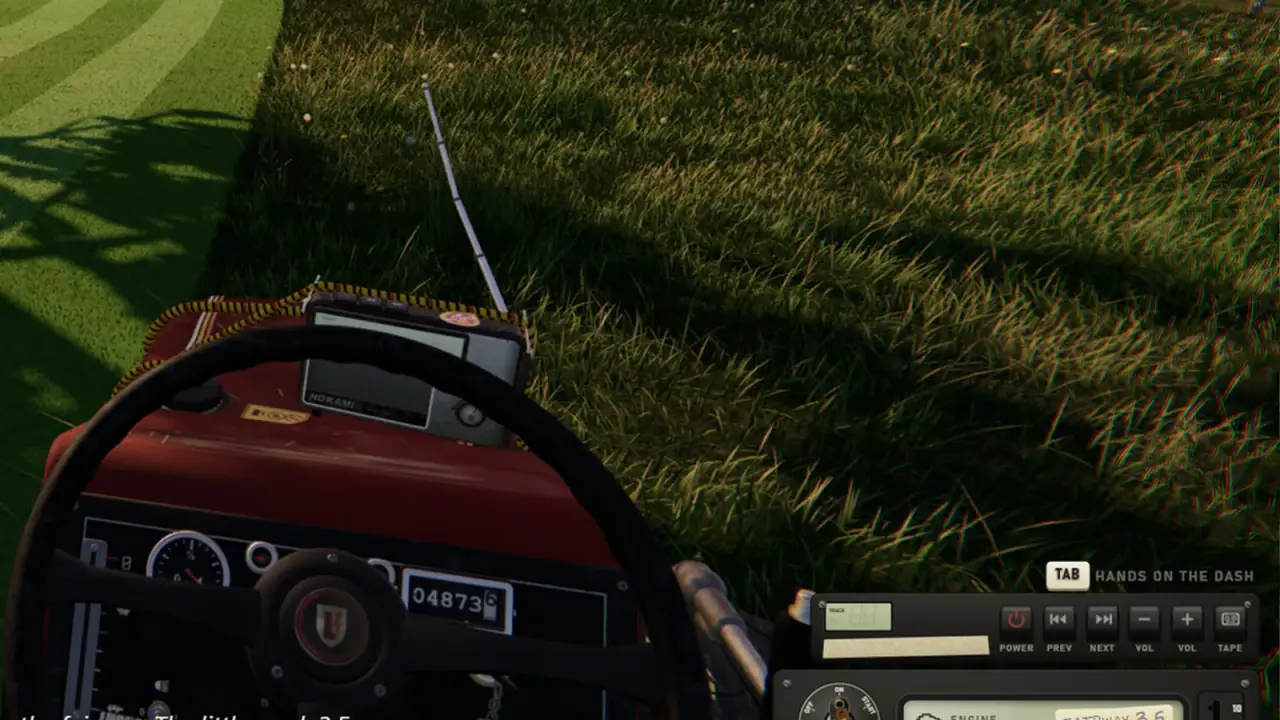
The radio is part of the dashboard. The confirmed controls include a radio among the mechanical switches and gauges. You can change station or turn it off while driving.
If the radio is too loud relative to the engine, use the game's audio sliders. There is no confirmed separate radio volume in the dashboard, but the options menu is the place to look.
The controller guide→ covers the general control layout if you are setting up a gamepad or wheel.
Troubleshooting custom audio
The game does not see my files. Check the format and the folder. If the game exposes a custom radio folder, put files there, not in a random subfolder.
The track plays but the name is wrong. Metadata may not be read. Rename the file clearly before loading.
Shared Music does not work. Confirm both sides consented. Check that the host has the feature enabled. Check that Streamer Mode is off.
A guest cannot hear the host's music. Shared Music is opt-in. The guest may have declined, or the host may not have enabled it for that lobby.
The stream has no music. Streamer Mode may be on. That is the intended behaviour.
What not to do
- Do not stream commercial music through custom radio.
- Do not enable Shared Music in a public lobby without asking.
- Do not upload game files to a music-sharing site.
- Do not assume the built-in permission covers your own tracks.
- Do not blame the game if a platform claims a song you loaded.
Official source: One More Lawn store page ↗ - the store describes the radio, custom audio, Shared Music and the streaming guidance for built-in music.
FAQ
Can I add my own music to One More Lawn?
Yes. The custom radio can load local audio.
Can I stream the in-game radio?
The developer permits streaming of the built-in radio music. Your own local tracks are a separate rights question.
What is Shared Music?
A co-op feature that lets the host share local audio with the lobby, with consent and without uploading files.
Does Shared Music upload my files?
No. The files stay local.
What does Streamer Mode do?
It disables Shared Music, which prevents guests from broadcasting audio you may not have rights to.
Are the radio songs AI-generated?
The store discloses that some are. The reaction has been mixed; the songs are optional in the sense that you can turn the radio off.
Sources
- One More Lawn store page ↗ - radio, custom audio and streaming guidance.
- One More Lawn demo ↗ - demo radio behaviour.
- Steam community discussion: AI music ↗ - player reaction and developer context.
- Steam community discussions ↗ - general audio and feature reports.